

Introduction
I’ve spent the last several years designing and building WordPress sites with Elementor for startups, solo founders, and a smattering of mid-sized teams. If we were sitting down for coffee and you told me you want to become a better web designer this year, here’s what I’d actually tell you. I’ll skip the fluff and focus on the craft: planning structure, shaping visual language, building clean layouts, and getting your sites fast, accessible, and maintainable. I’ll talk through how I work, with practical examples that fit the reality of WordPress + Elementor projects.
What “web design” actually looks like day to day
When I say web design, I’m talking about more than making things look nice. Most days begin with clarity: what the page needs to do, who it’s for, and what success looks like. I sketch a structure—usually in a notebook—deciding where the headline lands, how the hero earns attention without shouting, and how the next section supports the promise made at the top. I’m thinking in blocks, not decoration. The visual language grows out of that structure: typography that reads well and sets hierarchy, color that guides attention without yelling, and spacing that gives the page room to breathe.
Then I map content layout. It’s not just “where text goes,” it’s how it’s chunked so a tired brain at 11pm can still follow it. I show it to the client like a product owner—because that’s who they are—and ask practical questions: does this section answer the top three questions your audience brings to this page?
Example—Turning a messy brief into a layout: A founder says, “We help creators launch courses.” I translate that into a hero that promises “Launch your course in a week,” a proof section with a couple of fast case notes, and a CTA to book a quick call. If the proof is weak, I don’t hide it with visuals; I help them collect better proof or adjust the promise. Structure tells the truth.
Why WordPress + Elementor remains practical in 2025
I use WordPress and Elementor because they let me ship fast without giving up control. I can design a system, not just a page, and hand over something clients can actually update. I start with a lean base—minimal theme and a short, intentional plugin list—so the site stays fast and predictable. Elementor’s container-based layout is the heart of the build: it gives precise control over spacing and structure while letting me create reusable patterns. I rely on Global Styles and a small set of design tokens—colors, typography, spacing—to keep everything consistent.
Accessibility: build it in from the first component
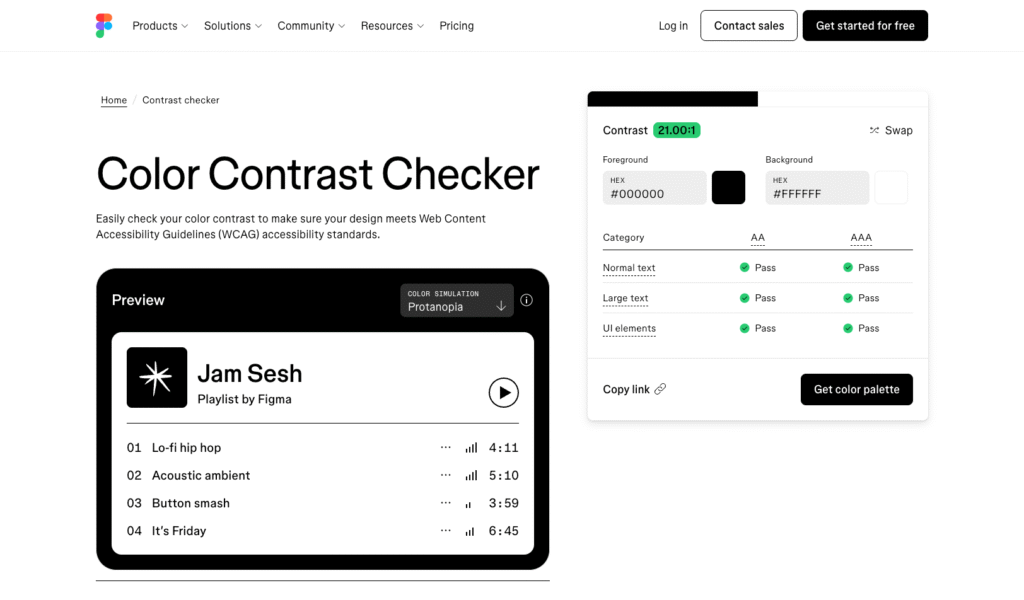
Accessibility isn’t a checklist you run at the end; it’s a habit you put into every component from the start. I aim for readable contrast and solid keyboard navigation as a baseline. That means headlines aren’t floating over photos without an overlay, body text isn’t “almost gray,” and focus states are obvious, not invisible. Heading order matters: one H1 per page, then H2s and H3s in a logical outline. For color, I keep an accessible palette that passes standard contrast and set these as Global Colors so I don’t re-check every block.
Performance without the drama: make interaction feel instant
Remove friction, avoid heavy add-ons, and test on a mid-range phone.
A site that looks great but lags is like a car that hesitates at every green light. The feeling I watch is responsiveness after a click or tap. If interactions feel snappy—roughly a couple hundred milliseconds—you’ve done most of the job. In WordPress terms, this starts with restraint. Use only plugins that earn their keep. Keep animation purposeful, especially on mobile. Avoid stacking multiple visual builders or “mega” effect add-ons on top of Elementor.
Images are exported at realistic sizes in modern formats and lazy-loaded. Fonts are limited to what you truly need; variable fonts help reduce requests. I prefer self-hosted fonts with a fast display strategy so text appears promptly. Most importantly, I test on a mid-range phone over a normal connection. If the “feel” is off, I check the heavy scripts and remove what doesn’t deserve to be there.
Responsive design in 2025 means thinking in containers, not just screens
Build designs that adapt to their space, with fluid type and spacing that scale gracefully.
The old way was designing three static sizes. The modern way is designing elements that flex intelligently in whatever space they land. I still use breakpoints, but I rely on container-based layouts so components adapt to their actual width. In Elementor, containers are the building blocks, and I design cards and heroes to behave well as they shrink or stretch.
Typography scales between sensible limits so headlines don’t overwhelm small screens or whisper on large ones. Spacing follows suit—more breathing room on wide viewports, tighter where space is scarce. My favorite test is dragging the browser window slowly. If the layout respects itself at every size, we’re good; if it breaks in awkward ranges, the component needs a smarter internal rule.
The part of “code” you should actually care about as a designer
Semantic HTML and a bit of CSS literacy make your designs accessible and consistent.
You don’t need to be an engineer, but a little code awareness makes your work sturdier. Semantic HTML is the difference between “looks like a button” and “is a button.” Use real buttons for actions, links for navigation, headings for hierarchy, and sections to group content. Assistive tech and browsers expect this, and your interactions will be more reliable by default.
CSS is where your craft sharpens. Learn what a class is, how specificity works, and how to use variables. In Elementor Pro, Custom CSS is there when you need it. I use it sparingly to unify a focus outline, refine a grid, or define spacing tokens. You’re not fighting the page builder—you’re guiding it.
Building a small design system inside Elementor
A site feels coherent when decisions repeat on purpose. I set Global Fonts and Global Colors, then define a simple spacing rhythm. From there I make a few core patterns: a hero template with two or three variations, a feature card that works with short or long text, a testimonial that reads well even without a headshot, and a CTA block that looks good stacked or inline.
Example: Consistent spacing
Start every project with clear structure
Discovery starts with listening. I ask the client to walk me through a real user journey: how people find them, what they need, where they get stuck. I capture that in a page outline that includes the purpose of each section. Then I move to visuals: a moodboard to lock tone and a low-fidelity wireframe to agree on structure. I prefer committing to structure early; it carries the business goal.
Once approved, I build a small proof of concept in Elementor—one hero, one card, one form. This is where performance and accessibility habits enter the build. I set global styles, choose typography, and confirm spacing feels right on mobile and desktop. Then I scale to the rest of the pages, reusing patterns. Content comes in early, even imperfect. Launch is the end of testing, not the start of “fixing later.” I test forms, keyboard navigation, and obvious device sizes. I trim assets, compress images, and back up the site. Finally, I record a short Loom walking the client through updates.
Clients, scope, and the work you don’t learn in tutorials
A creative’s life is two jobs: design and expectation management. I’m upfront about what’s included, how many revisions we’re doing, and what counts as new scope. I set a content deadline early, because missing copy derails timelines more than design ever does. When clients ask for things that slow the site or muddy the experience, I explain the trade-off and suggest a better route. Good guidance is the value; not saying yes to everything.
After launch, I recommend a simple care plan: backups, updates, basic performance checks, and a bit of monthly change time. It keeps the site safe and the relationship active. It also gives you real-world feedback—what pages users visit, which CTAs they click, and where the next iteration should go.
Closing thoughts
Rely on fundamentals and make small, consistent choices that respect users and content.
Becoming a better web designer in 2025 isn’t about chasing every new feature. It’s about being reliable in the basics and opinionated where it matters. Plan the structure, shape a clear visual language, build resilient components, and keep the site fast and accessible. Use WordPress and Elementor like the power tools they are, not shortcuts to avoid thinking. If your process is honest and your patterns are simple, the sites you ship will feel calm, confident, and effortless to use—and so will you.